Precisely schedule and target your campaigns
Control when, where, and to whom, your ads appear with flexible scheduling, delivery limits and a wide variety of advanced targeting options.
Schedule campaigns with a start and stop date/time. Optionally limit them to run on certain days of the week or during specific hours of the day.
- Set campaigns to run until they reach a certain number of impressions, clicks or actions.
- Spread impressions evenly across each day of a campaigns flight.
- Our advanced traffic analyzer ensures that campaigns deliver on time by fitting impression delivery to your traffic patterns.
- Daily limits can also be set to accomodate fixed-budget campaigns, non-guaranteed campaigns and flexible campaigns.
Frequency capping helps prevent your campaigns from becoming over exposed to avoid creative burnout.
Our unique page-level capping feature allows you to control how many impressions a campaign can display per page view. Consider a campaign that contains 728x90, 300x250 and 160x600 creatives. Such a campaign could be setup to show one banner of each size without duplicating any of them or it could be set up to only show 1 view per page if you don't want them to appear together.
Display multiple companion ads on a page together at the same time to reinforce an advertisers brand.
Avoid showing ads from competing advertisers together on a page at the same time.
- Continent
- Country
- State/province
- City
- Zip/postal code
- Designated marketing area (DMA)
- Time zone
- Operating system
- Browser
- Device type
- ISP / organization
- Keywords
- IP address
- Hstname
- Page URLs
- Content themes
Create up to 10 custom fields to pass demographic data as key/value pairs from cookies, databases or other sources to the ad server for targeting and reporting.
Matching ads with relevant content can be difficult for ad networks, blogs, forums or large web sites. With contextual targeting it becomes easy. Pages are regularly spidered and full-text indexed, so you can target campaigns to pages with relevant keywords and phrases. Keywords can be required to occur a minimum number of times to guarantee contextual relevance.
Automatically perform A/B testing on campaigns that have multiple same-sized creatives to optimize their delivery and drive more clicks to your advertisers.
There are a surpising number of products and services where weather can play a key role in the consumers decision making process, which is why AdvertServe allows for dynamic creatives and targeting of campaigns based on weather conditions (i.e. sunny or raining), temperature and humidity ranges.
Easily serve and automatically track impressions and clicks on third-party ads from DoubleClick, Google, Sizmek and dozens of others.
Simplify inventory managmement with ad zones
When designing your web site you probably coded placeholders into the spaces where your ads should appear.
Each of those spaces is called an ad zone. The purpose of ad zones is twofold: they define the inventory that you have available to sell and they also segment your ad space to allow precise placement control and deeper reporting insights.
Some campaigns are more important than others, so it's essential to have a way to convey this to the ad server. AdvertServe gives you ultimate control here by allowing you to have up to 101 tiers within each of your zones! Your higher paying campaigns can be placed in higher tiers, third-party ads can be placed in mid-level tiers and in-house campaigns can be placed in lower tiers. This guarantees that all of your ads get their share of impressions while maximizing your revenue.
When multiple campaigns are placed in the same tier you can give them each a priority to control their impression share. In fact, because priorities go from 1 to 100 you can treat them like percentages. For example, you may have one campaign with a priority of 30 and another with a priority of 70 and they would get a 30%/70% split of any impressions that fall into that tier.
Have a responsive web site that adapts itself to tablet and mobile devices? Your ads should be responsive too! Automatic zone substitution allows different sized zones to be served to your tablet and mobile users. For example, you can have a 970x90 zone for your desktop users that automatically switches to an alternate 728x90 zone for tablet users or a 320x50 zone for mobile users.
By setting frequency caps on your zones you're able to limit impressions of interruptive forms of advertising such as lightboxes or full page overlays. Consider that you might have several full page overlays that you want to display once per day, but you want to spread them out throughout the day. Simply set a frequency cap of 1 view every 1-2 hours on your zone as well as a frequency cap of 1 view per day on each of your campaigns and this goal can easily be achieved!
Certain types of targeting may warrant a campaign to take exclusive priority over others. Take keyword targeting for example. By treating keyword targets as exclusive, you can guarantee that a zone will return a keyword matched campaign when possible rather than showing campaigns that might also match less important targets.
Choose the pricing model that works for you
Sell your ad space directly to your own advertisers on either a CPM, CPC, CPA or flat rate basis. Publishers can also accommodate budget-based advertisers. Just enter a deposit for your advertiser and their campaigns will run until their balance is depleted.
Charge your advertisers based on impressions using the standard CPM pricing model and you can also pay your publishers a percentage of this rate as well.
Charge your advertisers based on total clicks or unique clicks.
Charge your advertisers based on total actions or unique actions. What are actions? Commonly they are used to represent leads or sales that are generated after a visitor views or clicks on one of the advertisers ads.
Sometimes an advertiser might just want to pay a set amount to run their campaign on your web site for a specified period of time. Flat rate is useful in this type of scenario. You can also define a flat rate to pay out to publishers and it will automatically be distributed amongst your publishers based on their impression share.
Maximize your revenue stream by intelligently combining direct sales with programmatic demand
Haven't sold all of your available inventory? Not to worry! AdvertServe supports header bidding with Prebid.js so you can work with programmatic demand partners as well as with third-party ad networks to fill your unsold inventory.
Banners and text ads are great, but you definitely don't want to limit yourself to them. Adding premium creatives like castaways, carousels, crawlers, expandables, flips, HTML5 banners, lightboxes, full page overlays, page peels, pushdowns, shoutboxes, smoke screens, video ads and wallpaper ads is easy to do with AdvertServe. Unlock the full earnings potential of your web site by offering these highly effective creative options to your advertisers.
Have a responsive web site that adapts itself to tablet and mobile devices? Your ads should be responsive too! Automatic zone substitution allows different sized zones to be served to your tablet and mobile users. For example, you can have a 970x90 zone for your web users that automatically switches to an alternate 728x90 zone for tablet users or a 320x50 zone for mobile users.
Complete support for VAST 2.0/3.0/4.0 and VPAID 2.0 enables you to monetize video with both direct sales and third-party ad networks.
Other ad servers can take up to 24 hours to update your reports. How are you supposed to effectively optimize your campaigns when you're waiting that long for feedback? With real-time reporting you'll be able to spot trends instantly and take advantage of them without delay.
Integrating ad zones into your web site, mobile app or video player is quick and painless
Our code wizard enables you to generate ad serving tags for your ad zones with just one click! We offer a wide variety of ad serving tags to meet your needs, including standard JavaScript and IFRAME tags that will work on any HTML, XHTML or HTML5 web site as well as simpler IMG tags for HTML e-mail newsletters.
-
Increase Viewability
One of the biggest problems with achieving a high viewability rate is that you often need to eliminate below the fold ad placements, which reduces your overall ad inventory and increase the cost to advertise on your site. Our AJAX code offers a simple solution to this problem. We simply delay loading of ads until users scroll down the page to where the ads are placed, which guarantees a higher viewability rate. -
Search Engine Optimization
You aren't getting the highest possible search engine ranking if you're not serving your ads with AJAX! Google and Yahoo factor page loading speed into their ranking algorithms. AJAX serving allows page content to load first, so your ads will not negatively affect your score. -
Programmatic Control
With our AJAX code you have the option to take complete programmatic control over when each individual ad zone loads and receive callback notifications when they do load so you can execute additional custom logic.
Create up to 10 custom fields to pass demographic data as key/value pairs from cookies, databases or other sources to the ad server for targeting and reporting.
Have a custom search on your web site? You can pass keywords from searches as key/value pairs.
Matching ads with relevant content can be difficult for ad networks, blogs, forums or large web sites. With contextual targeting it is easy. Pages are regularly spidered and full-text indexed, so you can target campaigns to pages with relevant keywords and phrases. Keywords can be required to occur a minimum number of times to guarantee contextual relevance.
Spot trends instantly with real-time reporting
Refining your campaigns to earn maximum profits demands real-time reporting and AdvertServe delivers!
Other ad servers can take up to 24 hours to update your reports. How are you supposed to effectively optimize your campaigns when you're waiting that long for feedback? With real-time reporting you'll be able to spot trends instantly and take advantage of them without delay.
Many advanced techniques are utilized to filter non-human traffic (IVT) out of your reports to ensure reporting accuracy. At the core of this is our collaborative blacklist. It combines real-time IP intellegence data from our own research, third-party vendors and our customers to filter out anonymous proxies, crawlers, harvesters, malicious networks, web servers, botnets and other forms of non-human traffic. AdvertServe can also be integrated with Forensiq to provide additional intelligence data.
Here at AdvertServe we understand that metrics go far beyond just views, clicks and CTR.
- Standard Metrics: Share of Voice, Views, Clicks, CTR, Actions and ACR
- Conversion Metrics: Conversions, View-Through Conversions, View-Through Conversion Rate, Click-Through Conversions, Click-Through Conversion Rate and Revenue
- Event Metrics: Custom Event Counters, Exit Counters and Triggered Rate
- Interactive Metrics: Interactive Views, Interactive Rate, Interactive Time, Average Interactive Time, Interactive CTR, Expanded Views, Expanded Rate, Expanded Time, Average Expanded Time, Total Engagements, Engagement Rate, Unique Engagements and Unique Engagement Rate
- Inventory Metrics: Utilization, Paid Views/Clicks/CTR, Default Views/Clicks/CTR, Total Views/Clicks/CTR, Missed Ops, Blacklist Hits, Robot Hits and Filtering Rate
- Video Metrics: Requests, Start, First Quartile, Midpoint, Third Quartile, Complete, Replay, Pause, Resume, Mute, Unmute and Fullscreen
- Viewability Metrics: Viewable Impressions, Viewable Rate, Viewable Time and Average Viewable Time
The fact is that few ad servers even come close to matching the 58 distinct metrics we provide.
Reports can be generated on-demand for any date range and only with the content that you specify. When your report is generated, you can sort data by any column in ascending or descending order too. You can even edit your report to adjust criteria if it's not quite what you wanted without having to re-enter all of your initial criteria.
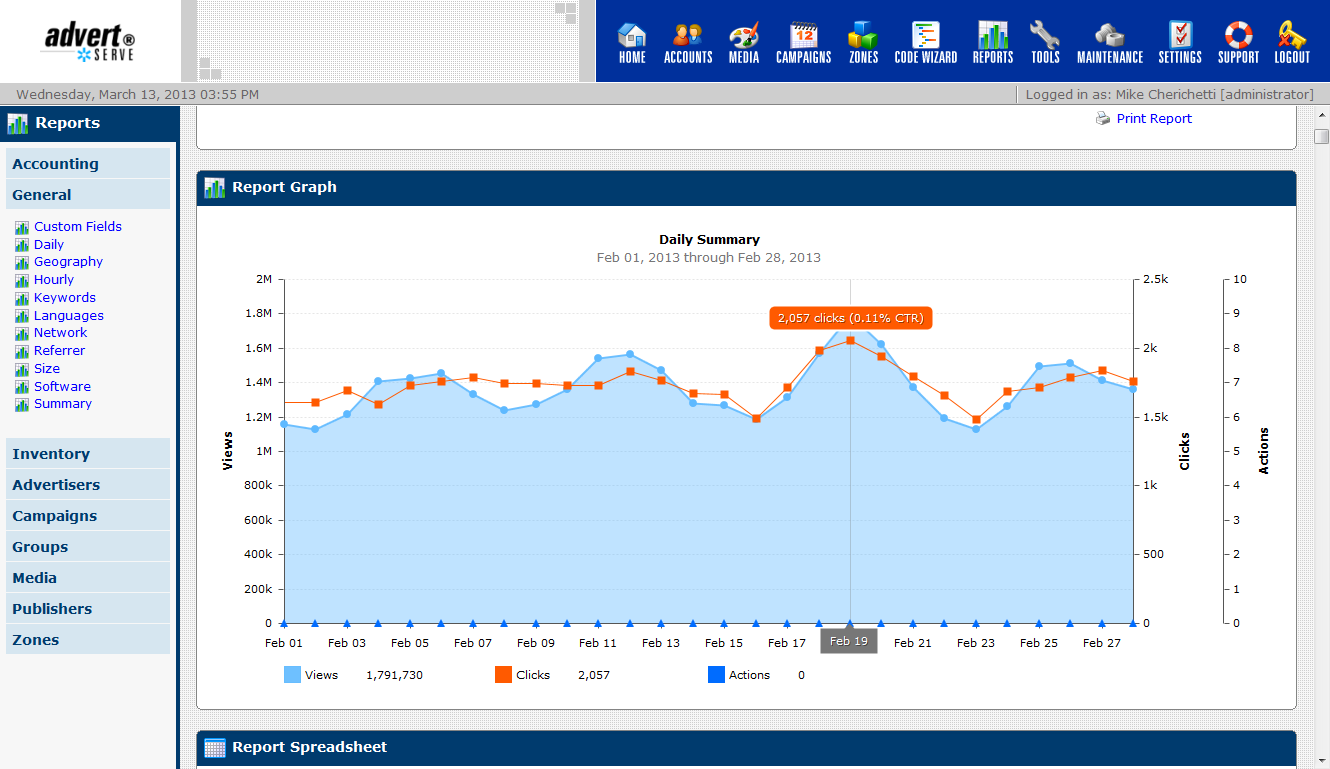
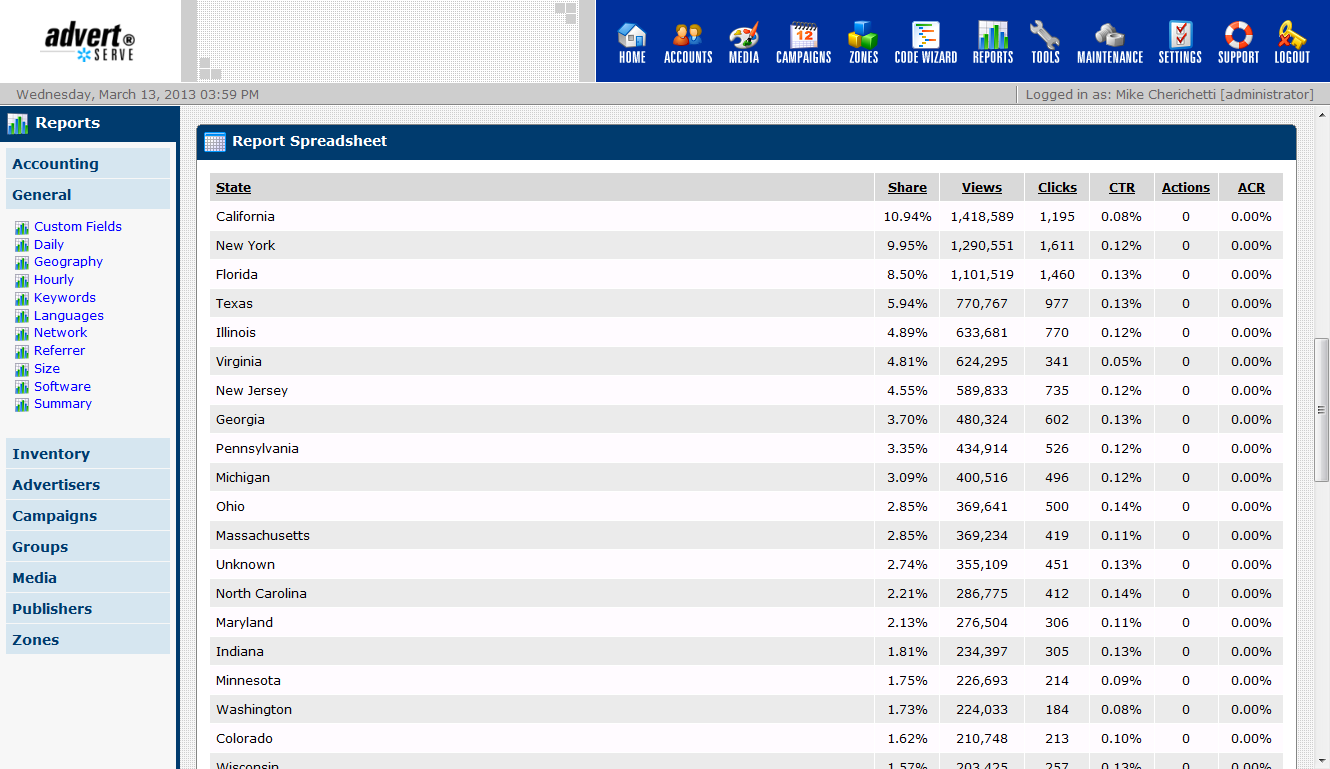
Our reports feature interactive charts and maps that allow you to quickly visualize data. Data is also presented in a familiar spreadsheet format with more detail. This allows you to further analyze data with additional metrics not shown in the charts.

Export reports to CSV, Excel, HTML, JSON, PDF, TXT and XML formats with a single click. The PDF and TXT formats are great for e-mailing to your advertisers and publishers. When you need to post-process data for further analysis the CSV, Excel, JSON and XML formats can be imported into the reporting intelligence software of your choice. In fact, our API supports exporting all of these formats so you can automate such processes.
Have a development or staging web site? Odds are those internal web sites generate a lot of traffic, but your clients are not paying you to view and click on their ads! For that reason, AdvertServe allows you to easily filter their traffic out of your reports.
Unlock the full potential of HTML5 advertising
Creating and deploying interactive HTML5 banners can be a painful experience if you don't have an HTML5 powerhouse like AdvertServe in your corner.
When you upload HTML5 banners to AdvertServe they get deployed to our CDN automatically. As a result your HTML5 banners load in the blink of an eye and you pay nothing for bandwidth. Don't get swindled by other ad servers who charge extra for creative hosting or cheap out and require you to use your own CDN.
One of the challenges with using a CDN is ensuring that they have the latest versions of your HTML5 files cached. In fact, it can be a real disaster if they have mixed versions of your files as this can often lead to unexpected scripting errors. The smart engineers at AdvertServe worry about these sorts of things though, so they implemented an auto-versioned URL scheme that allows for both safe and instant deployment of changes.
What really sets AdvertServe apart from the competition is our HTML5 JavaScript API, which only adds 3KB to the size of your banner and enables:
- Expandable banners
- Pushdown banners
- Lightbox takeovers
- Fullpage takeovers
- Custom counter events
- Multiple exit events
- HTML5 video playback events
- VAST/VPAID native player
- Fire third-party pixels
- Detect visibility
- Detect mouse proximity
Add an element of personalization to creatives with our geographic, language and weather data macros!
We support all commonly used file types for HTML5 banners, which includes: .css, .eot, .gif, .htc, .ics, .jpg, .js, .json, .otf, .svg, .png, .ttf, .woff and .woff2 while offering a generous 2.5 MB total file size limit.
AdvertServe makes testing a real pleasure with its auto-generated HTML5 test pages, which provide you with a quick and effective visual validation that all of your tracking points are functioning correctly. Take note that our test pages also allows you to simulate different geographic locations and weather conditions. This makes testing personalized creatives a real pleasure!
Deliver a wide variety of ad types on your web site
Offer your advertisers more effective creative options such as castaways, carousels, crawlers, expandables, flips, HTML5 banners, lightboxes, full page overlays, page peels, pushdowns, shoutboxes, smoke screens, in-banner videos, pre/mid/post-roll video ads and wallpaper ads in addition to traditional banners, text ads and popups and popunders.
Preview and test your ads directly on your web site to verify that they display and click-through correctly before they go live.
Use our geo testing add-on for Chrome and Firefox to test your geo-targeted ads in a matter of seconds without using a proxy server!
How many times have your advertisers sent you an HTML5 banner with a broken clickTAG? AdvertServe eliminates this constant headache by automatically fixing them. No more going back to your advertisers and asking them to make corrections!
Deploying a banner that contains malware can permanently damage your reputation, so it's nice to know that AdvertServe is scanning asset files to ensure they're free of any malware or known exploits.
Deliver ads to tablet and mobile users via a mobile web site or a mobile app with the same tools that you use for your web site
Offer your advertisers more effective creative options such as carousels, castaways, crawlers, expandables, flips, HTML5 banners, lightboxes, full page overlays, shoutboxes, smoke screens, in-banner videos and pre/mid/post-roll video ads in addition to traditional banners and text ads.
Have a responsive web site that adapts itself to tablet and mobile devices? Your ads should be responsive too! Automatic zone substitution allows different sized zones to be served to your tablet and mobile users. For example, you can have a 970x90 zone for your web users that automatically switches to an alternate 728x90 zone for tablet users or a 320x50 for mobile users.
Integrate ads into your Android and iPhone apps with the same ad serving tags that you use on the web.
Target ads by mobile operating system, mobile browser and device type (i.e. tablet or mobile phone).
Easily generate AMP ad tags with our code wizard, which enables you to integrate banner ads and sticky ads into accelerated mobile pages.
Rapidly create and deploy great looking in-banner videos
Creating and deploying HTML5 in-banner video can be a painful experience if you don't have a video powerhouse like AdvertServe in your corner.
When you upload videos to AdvertServe they get encoded and deployed to our premium CDN automatically.
Our visual design tools allow you to rapidly enhance videos with background images and call to action buttons or add videos to pushdown banners.
Pay only for the video bandwidth you use with no minimum commitment:
- North America & Europe: $0.03/GB
- South America, Asia & Oceania: $0.07/GB
Other services charge additional fees for video storage and encoding, but with AdvertServe you get those for free.
Complete support for VAST 2.0, 3.0, and 4.0 as well as VPAID 2.0 enables painless integration with video players across all major platforms
Offer your advertisers pre/mid/post-roll video ads along with companion banners, interactive HTML5 VPAID ads, and non-linear banners. Third-party VAST tags are also supported. This enables you to fill your unsold video inventory with VAST feeds from various third-party networks and exchanges.
With complete VAST 2.0, 3.0, and 4.0 support, you're able to accomodate both Flash and HTML5 video players to enable video advertising across both web and mobile platforms.
Support for VAST 3.0+ means you can use new features such as skippable ads and ad pods to play a sequence of multiple ads in a single ad break.
Fully compatible with Brightcove, JW Player, Kaltura, Video.js and many other VAST 2.0, 3.0, and 4.0 compliant video players. We also support automatic insertion of macros for the mentioned players. This enables painless integration of third-party VAST/VPAID tags that require macros for player width/height or video id, filename, title, description, duration and more.
Utilize our JavaScript API to load a VAST/VPAID feed into an HTML5 banner or VPAID HTML5 wrapper with just a few lines of code. Our API takes care of playing the video natively and also fires all of the necessary VAST/VPAID pixels. This is a great way to extend your pre-roll iventory by leveraging your display inventory.
Easy to use web-based control panel with complete co-branding support
With AdvertServe there is no need to install any software. Easily manage your ads right from your web browser. All major browsers and operating systems are supported: Chrome, Edge, Firefox, IE 6+, Opera and Safari on Windows XP/Vista/7/8/10, Mac OS X or Linux.
Do you want the login screen to display your company logo? No problem! Simply send us your logos and we'll install them for you at no additional charge. You can also use a custom domain such as ads.yourdomain.com so it won't be apparent to anyone that you're using AdvertServe.
Our user-friendly interface is easy to learn and enables you to complete tasks with minimal steps.
We keep a history of changes that are made to your campaigns, which allows you to review changes and see who made them.
Not sure what to enter into that field? Just click on the help icon above the field and we'll instantly pull up all of the relevant help that we have. No need to go hunting through hundreds of pages in a user manual.
Quickly locate advertisers, campaigns, media and ad zones with powerful searching capability.
If you need help, just click on the support icon and you can access our user manual, search our knowledge base or submit a trouble ticket with just one click!
Easily integrate reports into your Intranet, synchronize contact information with your CRM software or even build your own custom user interface with the API!
The API enables you to quickly manipulate and retrieve data from AdvertServe using familiar tools such as curl or wget. For more complex integration work you can choose from a wide variety of programming languages. The API is HTTP(S) and JSON/XML based so it can be used with C#, ColdFusion, Java, JavaScript, .NET, Perl, PHP, Python, Ruby, Scala and many other popular languages.

There are many potential use cases for the API, but some of the more typical things our customers do with it are:
- Automated data entry (signup forms)
- Bulk data insertion or modification
- Custom report creation
- Integrating data or reports into your Intranet
- Synchronizing contact data with CRM software
- Building custom user interfaces
Using another ad server? Bulk import your data with the API!
What sets our API apart from other ad servers? Our API is simple. You just make GET or POST requests over HTTP or HTTPS and it returns the data you requested in JSON or XML format. It's also very extensively documented. Go ahead, take a look at our API docs. That's actually the best way to dive in and start discovering what you can do with our API.
Save time and money with no upfront commitment
Just sign up for AdvertServe and you're ready to start serving ads! No hardware or software to buy, install or configure. We provide everything you need and make sure it keeps working with 99.995% uptime guaranteed!
We hate contracts and setup fees -- so we don't have them. Customer satisfaction is our goal and we work hard to keep your business.
Not sure if AdvertServe is right for you? Try it free for 45 days with no committment.
You can get started serving ads for as little as $199/Month without a long-term commitment. Our pricing scales down as you grow too. When you get to the point of serving tens of millions of ads per day you'll be paying less than $0.01 CPM!
Our technical support team has been praised time and time again by our customers since 1998 for their ability to respond quickly to questions and problems with solid answers and effective solutions.
Over 30,000 web sites have trusted AdvertServe with their ad serving since 1998
Our mission hasn't changed for the last 20 years: provide the best possible ad serving software with amazing support and at an unbeatable price!
When you choose AdvertServe, you are tapping into the power of hundreds of globally distributed servers that are working together to ensure your ads load as fast as possible. In fact, it's so fast that it's capable of loading 20+ ads per page in less than a second! Our largest customers serve billions of ads per month. You simply can't duplicate this in house with open source software without spending a fortune on servers, bandwidth and administrative costs.
We've been in this business for a long time and we know that every minute of downtime means lost revenue, so you can rest assured that we're doing everything we can to avoid it. To reach that goal, we operate our own private cloud infrastructure with Xen in both North America and Europe. Data is replicated in real-time between both facilities so we can automatically fail over within minutes if disaster strikes.
Creative files are transparently deployed to and served by our CDN which boasts over 50 points of presence (PoP) throughout North America, Europe, South America, Asia and Australia. Each PoP features multiple, dedicated 10GigE backbone connections and 100% SSD backed caches. This ensures that your ads load fast for all of your visitors no matter where they are located.
- Three data centers located in North America (East/West) and Europe (London) with automatic failover for continuous operation.
- Multiple redundant backbone connections and the usage of BGP4 routing protocol allows us to provide fast, reliable service with zero packet loss.
- 3,500 kva PowerWare UPS units provide instant backup power and 1.5 Megawatt Onan diesel power generators are utilized for extended power outages.
- Fully redundant cooling systems maintain an ideal temperature for optimum server performance.
- Inergen fire suppressant is utilized to smother fires without causing any of the damage done by messy foams or sprinklers.
- Secure passage throughout the data centers is insured by Microchip badge access entrances, biometric scanning devices, overhead cameras and motion/heat detection devices.
Duplicate backups are created daily and mirrored off-site. Your data is stored on a minimum of 6 hard disks at all times. Should disaster strike, your data is safe and can be recovered quickly.
Hackers target ad servers to utilize in the distribution of malware and viruses. AdvertServe stops them dead in their tracks. With zero security vulnerabilities since 1998, that's something you can depend on.
Frequently asked questions
Here are some questions we get asked a lot and their answers. Have more questions? Give us a call!
No, as of March 1, 2015 we are no longer offering a licensing option for the AdvertPro software which powers AdvertServe. Existing AdvertPro customers should consider switching to AdvertServe. If you have any questions about switching please contact your sales representative.
AdvertServe is fully compatible with all CMS software including Wordpress, Joomla, Drupal, Magnolia, Gossamer Links, Bricolage, Ektron, eZ Publish and Umbraco.
Yes, however, you will be responsible for purchasing the domain name and running the DNS for it. We will provision yourdomain.advertserve.com when your account is set up. You will simply need to set up ads.yourdomain.com as a CNAME for that domain.
Yes, it is permitted to serve ads to an unlimited number of web sites with a single AdvertServe account.
The answer to this question is fairly complicated. We recommend that you are at least somewhat familiar with HTML, but it is not required. AdvertServe will automatically generate HTML ad serving tags for you. You simply need to know enough to copy and paste that generated HTML code into your web pages where you would like your banners to appear.
All of the IAB standard sizes are pre-loaded by default for your convenience. It's possible to easily define your own custom sizes too. You're not stuck with a limited set of sizes like you are with many other ad servers.
AdvertServe uses standards compliant HTML and/or JavaScript code for displaying banners in your web pages, so it is 100% compatible with all dynamic web page technologies such as PHP, Perl, ASP, ASP.NET, JSP, ColdFusion and others.
Modal Dialog